Your foreman fills one report on the phone: weather, work performed, crew, photos, materials, equipment, delays and safety. The office reviews it, approves it, and has a dated record of every day on every job.
PILOTA daily reports are a dated record of each day on a jobsite, filled in from the PILOTA iOS or Android app or the web portal. Each report captures weather, work performed, crew and hours, photos with captions, material deliveries, equipment, delays and safety issues, and can be signed. Reports go to the office for approval and can be shared as a PDF.
When the report waits until the truck ride home, the delay that cost two hours and the delivery that came in short never make it on paper.
A dispute or a delay claim comes up months later and nobody can find what the site actually looked like on that day.
Without a report in by end of day, the PM calls around to learn who was on site, what got done and what is holding the job up.
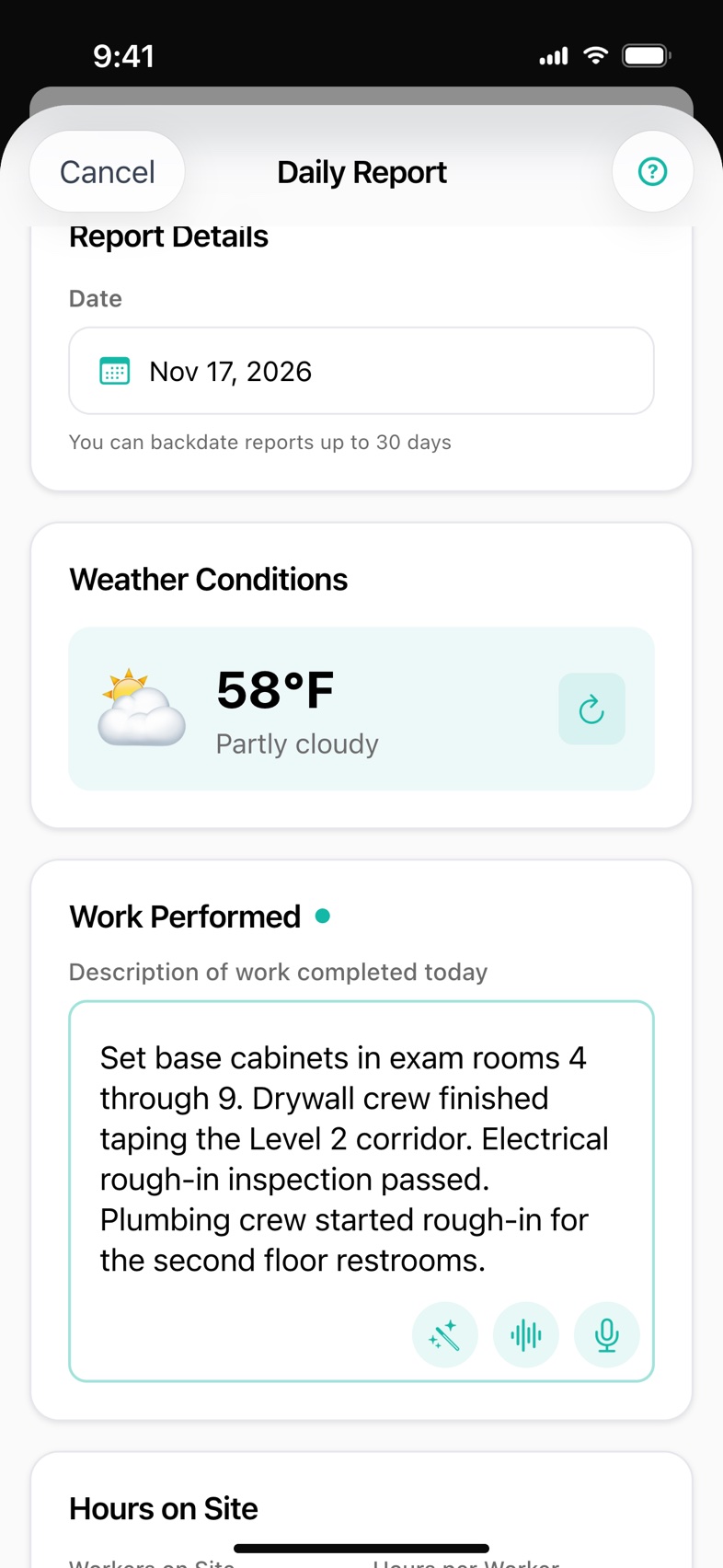
Pick the project and PILOTA pulls the day's conditions, temperature and wind for the job's location. If it can't load, you can retry or enter it by hand on the web.
Tap the mic on Work Performed and speak. The words land in the field as you talk, and one tap cleans them up into clear sentences when your company has AI set up.
Take photos or pick them from the library. On the apps every photo gets a caption saying where it was taken, and PILOTA keeps the time it was shot. A project can require at least one photo on every report.
Log workers and hours, reuse the crew from the last report, record material deliveries, add equipment with hours, and log each delay with a category and hours lost.
Note safety concerns, near-misses or incidents, link the day's toolbox talks, and keep lessons learned as an internal note that stays out of the client PDF.
Start from a saved template, sign on the phone screen, and come back to an unfinished report as a draft. No signal? The report saves on the phone and uploads when you're back online.
Start a new daily report from the app or the portal. Pick the project, or use a template, and the weather loads for that job site.
Dictate or type the work performed, add the crew, photos, deliveries, equipment, delays and safety notes, then sign.
Send it in. With no signal, it is saved on the phone and uploads on its own once you're back online.
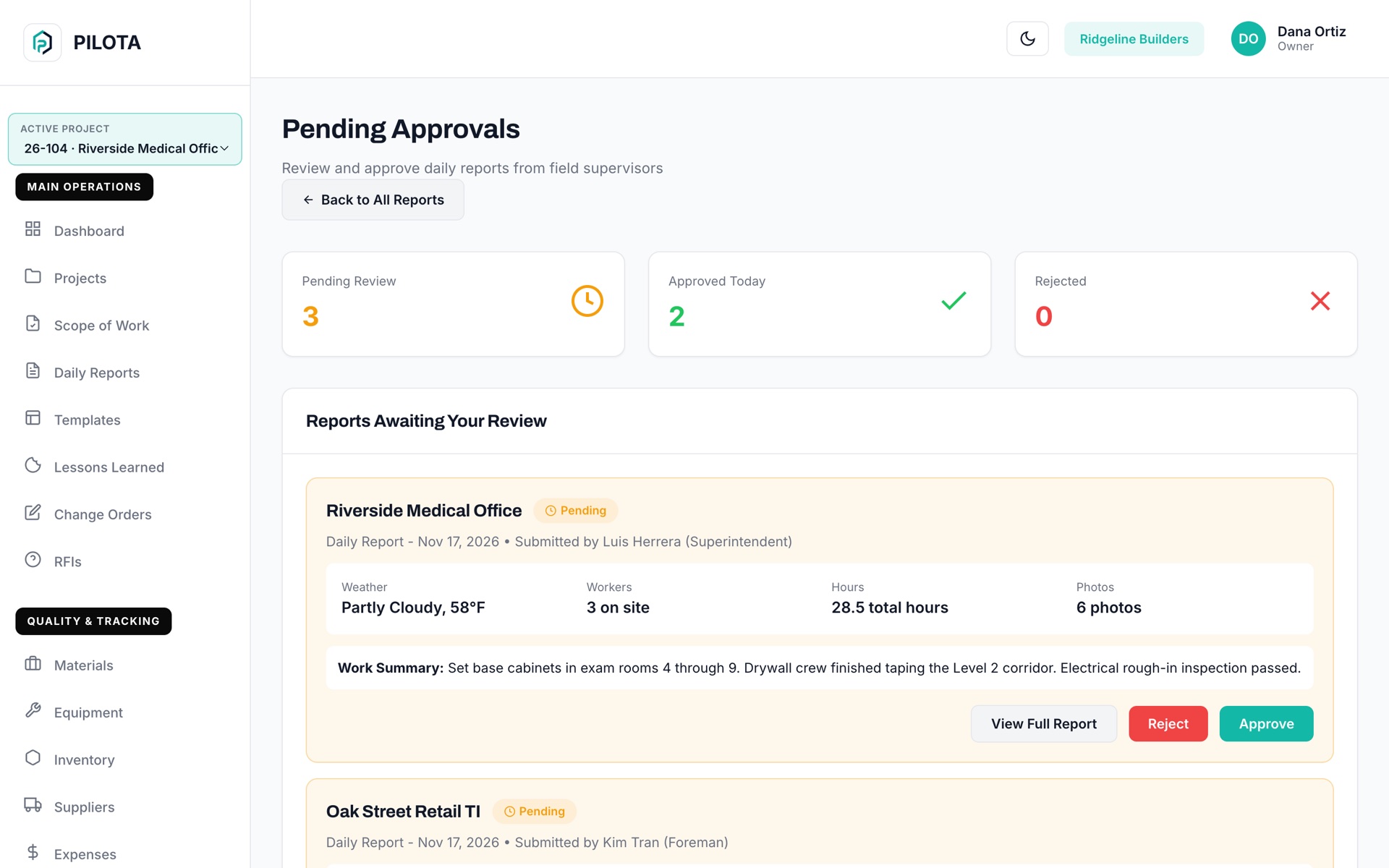
Managers see it under Pending Approvals with weather, workers, hours and photos at a glance, then approve or reject with a reason. The submitter is notified either way.
Delay claims, backcharges and change orders are won with a dated record of who was on site, what got done and what stopped the work. PILOTA gets that record filled in while the crew is still on the job.
Contractor teams that rely on daily reports day to day. Open one to see how it fits their work.
A construction daily report is a dated record of what happened on a jobsite: work completed, crew and hours, weather, deliveries, equipment, delays, safety issues and photos. In PILOTA it is filled in from the field on iOS, Android or the web portal and stored with the project.
Yes, on the PILOTA iOS and Android apps. A report submitted without signal is saved on the phone, with its photos and signature, and uploads automatically when the device is back online.
Yes. PILOTA lets you save report templates and start a new daily report from one, on the apps and in the web portal, so each report starts with the fields and defaults your company uses.
Submitted reports appear under Pending Approvals for managers, on the web portal and in the mobile apps. A manager can approve with optional notes or reject with a reason, and PILOTA notifies the person who submitted the report.
Yes. The PILOTA iOS and Android apps have Share PDF on each report in the list, and the web portal has Export PDF on the report view. Lessons learned are internal and are not included in the client PDF.
Yes. On the PILOTA mobile apps you can set the report date up to 30 days back, so a missed day can still be recorded on the right date.
Create your account, pick a plan, and your team is up and running the same day.
Get started PILOTA